


How to make a website with AI: the cheapest method

The cheapest way to make a website with AI is three accounts: Cloudflare for the domain and the free hosting, a Claude subscription that does the building, and a free GitHub account that keeps the site's files. Year one costs €28.21 before tax: €10.11 for a .com domain and €18.10 for one month of Claude Pro.
This guide is for plumbers, electricians, cleaners, roofers and every small business that works at the customer's address. You finish it with a live site on your own domain, a form that sends enquiries to your inbox, and a private page where you read every one of them. You create the accounts and pay; Claude does the rest in its browser.
What do you need, and why these three?
You need Cloudflare, Claude and GitHub, because together they cost the least and leave you owning everything. Each one does a job a website builder charges for every month.
- Cloudflare sells your domain at the price the registry charges, with no markup, and hosts the site for free. Requests to a site's static files are free and unlimited on the free plan, and the free plan runs 100,000 requests a day of code on top of that (Cloudflare Workers pricing). The same free account stores your enquiries in a database, stops spam with an invisible check and counts visitors without cookies.
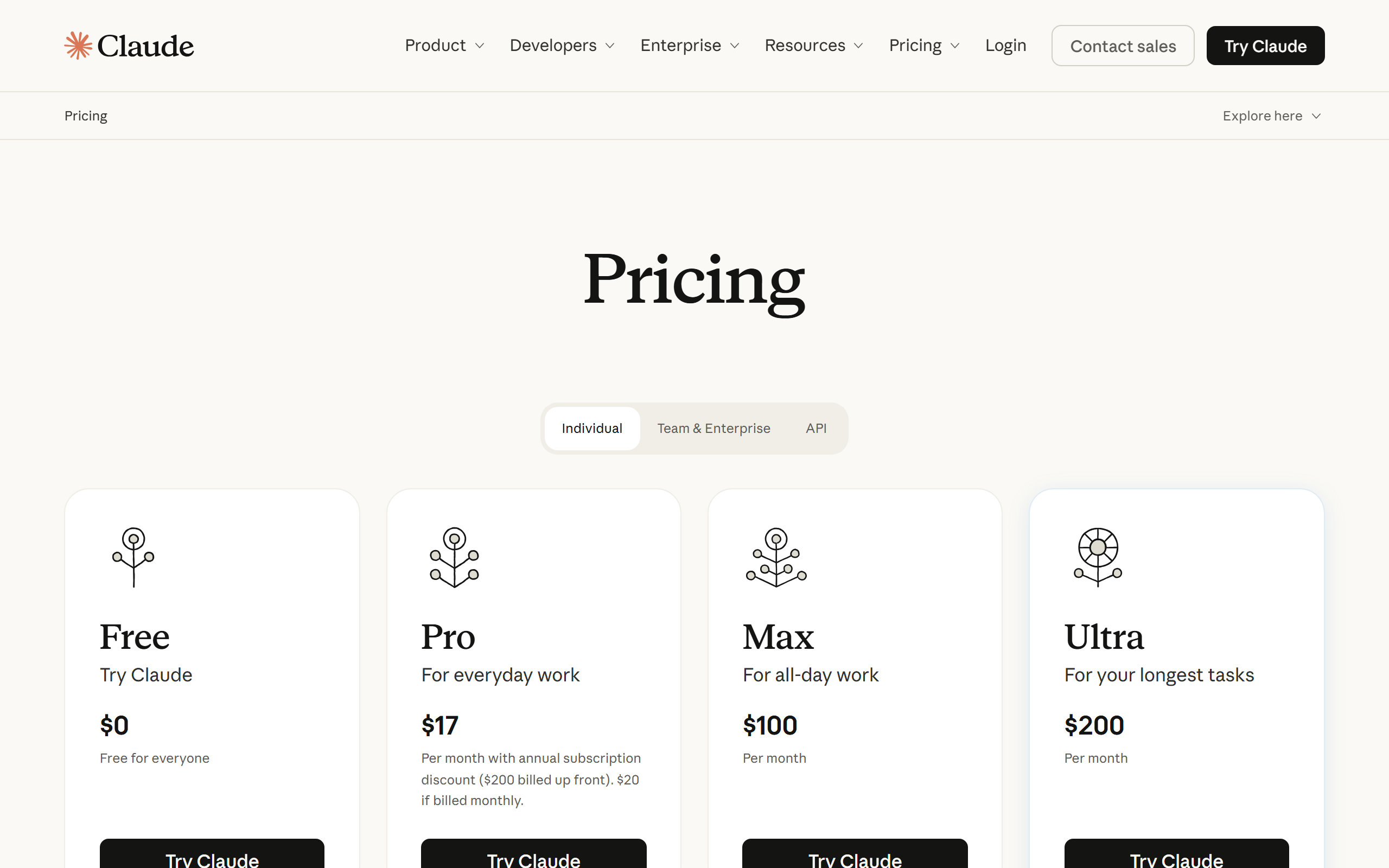
- Claude is the builder. Claude Pro costs $20 a month (Claude pricing) and the Claude desktop app has a built-in browser where Claude clicks, types and fills in forms while you watch. There's nothing to install beyond the app, and it runs on Windows and macOS (Claude's built-in browser). If you already work in Google Chrome, the Claude in Chrome extension does the same job there.
- GitHub keeps every version of your site's files. The free plan has unlimited private repositories (GitHub pricing), so every change Claude makes is saved and undoable.
The domain, the code and the enquiries sit in accounts in your name. Nobody holds your site hostage, and moving to another host later is a copy, not a rebuild.
What does a website made with AI cost?
A website made this way costs €28.21 before tax in year one and €10.11 a year after that, for a .com domain. The table lists every line with its source, at the European Central Bank rate of 13 November 2026 (1 euro = 1.1052 US dollars).
| Item | Price | Year one | Each year after |
|---|---|---|---|
| .com domain at Cloudflare | $11.17 a year, at cost | €10.11 | €10.11 |
| Hosting, database, spam protection, analytics on Cloudflare | Free plan | €0 | €0 |
| Code storage on GitHub | Free plan | €0 | €0 |
| Claude Pro for the build | $20 a month, one month | €18.10 | €0 |
| Google Search Console and Google Business Profile | Free | €0 | €0 |
| Total before tax | €28.21 | €10.11 |
The .com price is $11.17 at cost: Verisign's wholesale price of $10.97 from 1 November 2026 (Verisign first-quarter 2026 results) plus ICANN's fee of $0.20 (ICANN fee letter). Cloudflare sells domains at cost with no markup (Cloudflare Registrar). Claude, Squarespace and the other builders list their prices without tax, so the comparison below is before tax on every line (Squarespace VAT).
An Estonian .ee address isn't sold at Cloudflare. You buy it from an Estonian registrar: Zone.ee charges €8.37 a year plus 24% VAT, so €10.38 in year one and €11.15 a year to renew (Zone.ee). The site and everything else still runs on your free Cloudflare account.
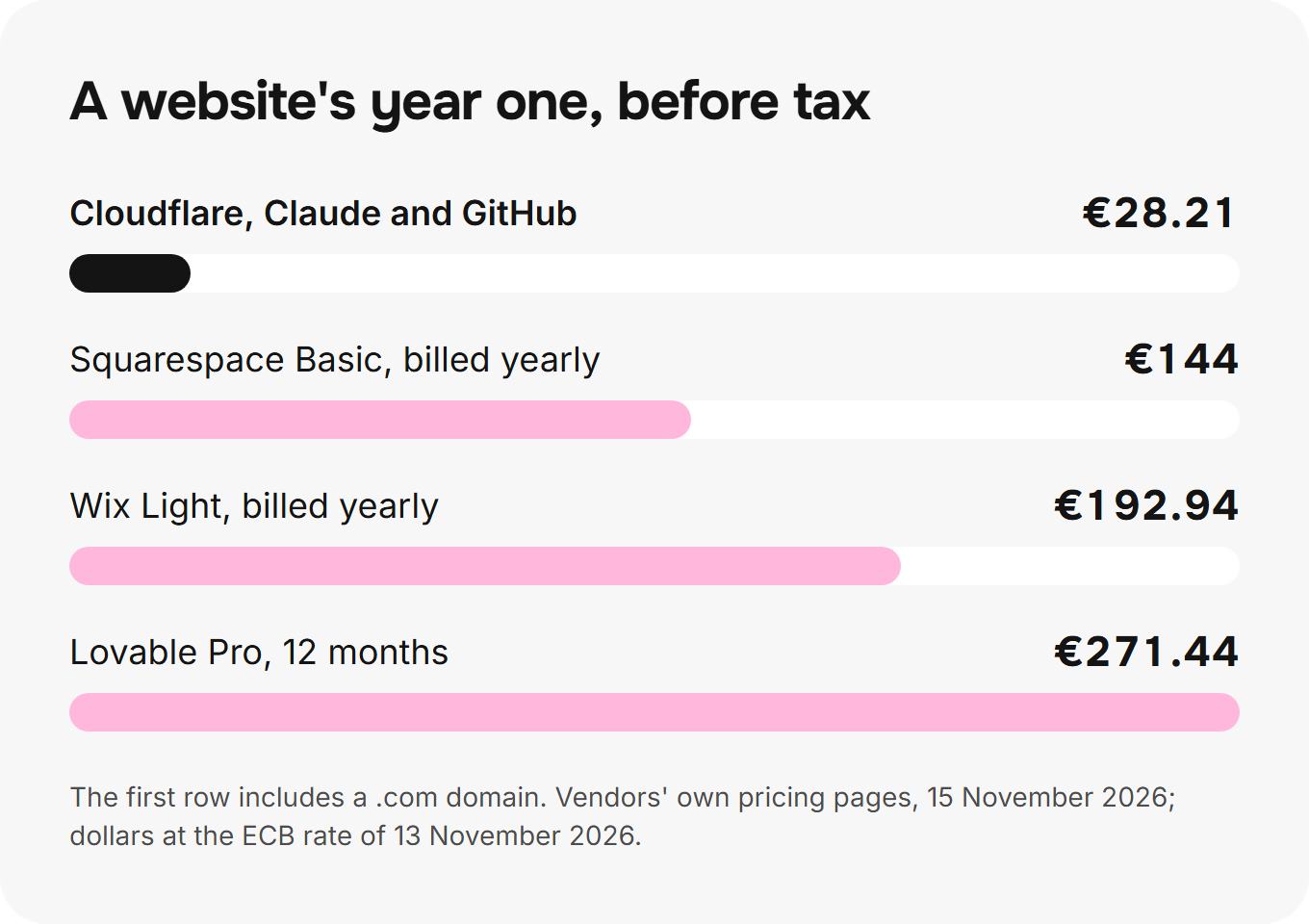
From year two the site costs only the domain. Take Claude for another month whenever you want a change: a new service page, new prices, a new language.
Do you need Lovable, Bolt or another AI site builder?
No: an AI site builder is a monthly subscription for the same work Claude now does in a browser on your own computer. The cheapest paid plan of Lovable is $25 a month (Lovable plans) and of Bolt is $25 a month (Bolt pricing). Twelve months of either is €271.44, 9.6 times this method's year one.
The builders were the shortcut when an AI chat only wrote code and you had to copy it somewhere. Claude's browser closes that gap: it opens the Cloudflare and GitHub pages itself, creates the project, deploys it and tests the form. All you do is make the accounts and pay when Claude asks.
A builder also keeps the site on its own platform. You rent the result, and the day you stop paying, the site stops. Here the files sit in your GitHub account and the site runs in your Cloudflare account.
How do you build the site, step by step?
You build it in eight steps and one afternoon: 3 hours and 32 minutes of clock time. 77 minutes of it are yours; Claude works through the rest.
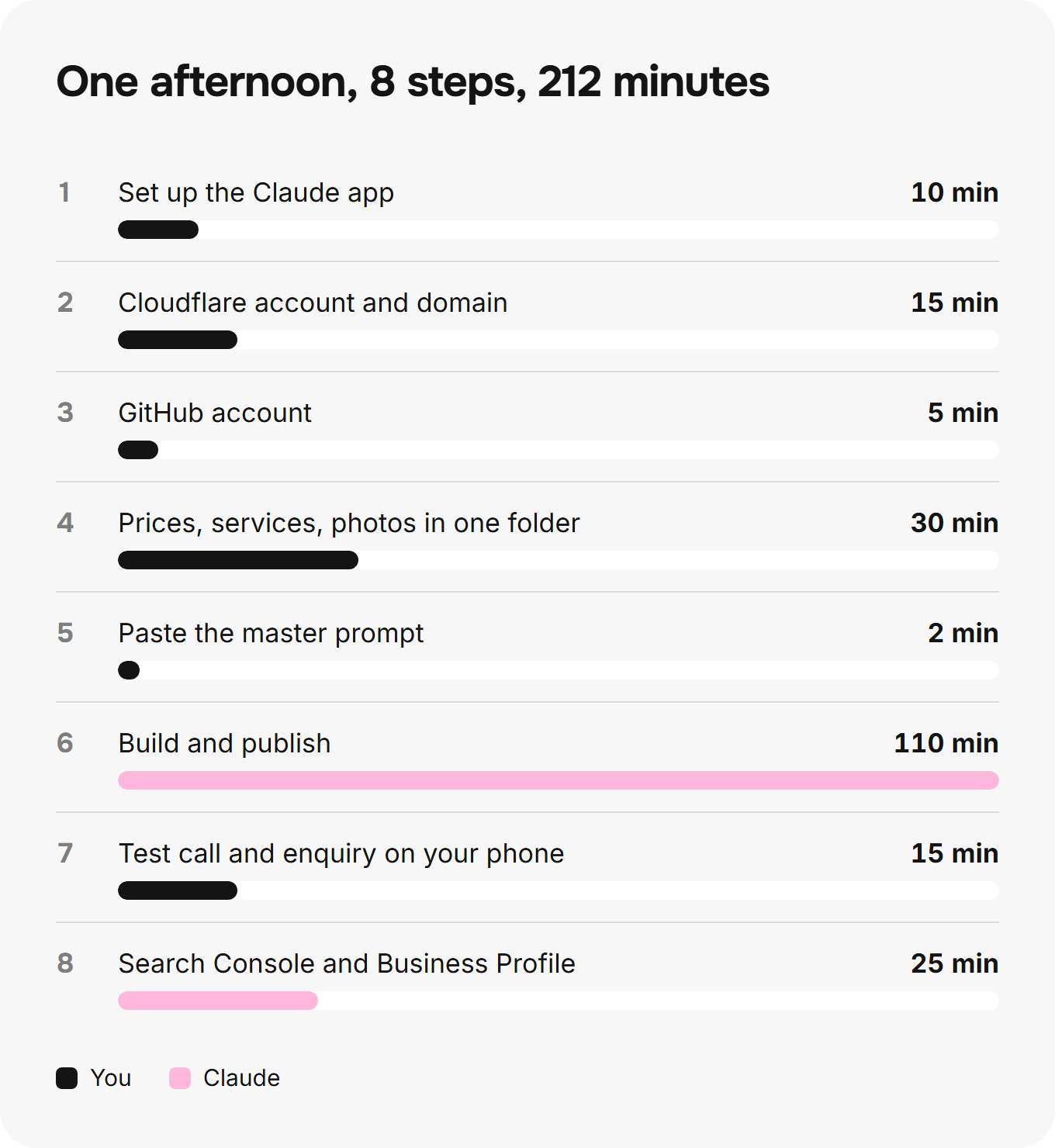
1. Set up Claude (10 minutes)
Download the Claude desktop app, sign in and take the Pro plan. The app's built-in browser is ready from the start: Claude opens pages in it, and you sign in to each site there once, as Claude reaches it (Claude's built-in browser). To keep everything in Google Chrome, add the Claude in Chrome extension instead (Getting started with Claude in Chrome).
 (opens full size)
2. Open the Cloudflare account and buy the domain (15 minutes)
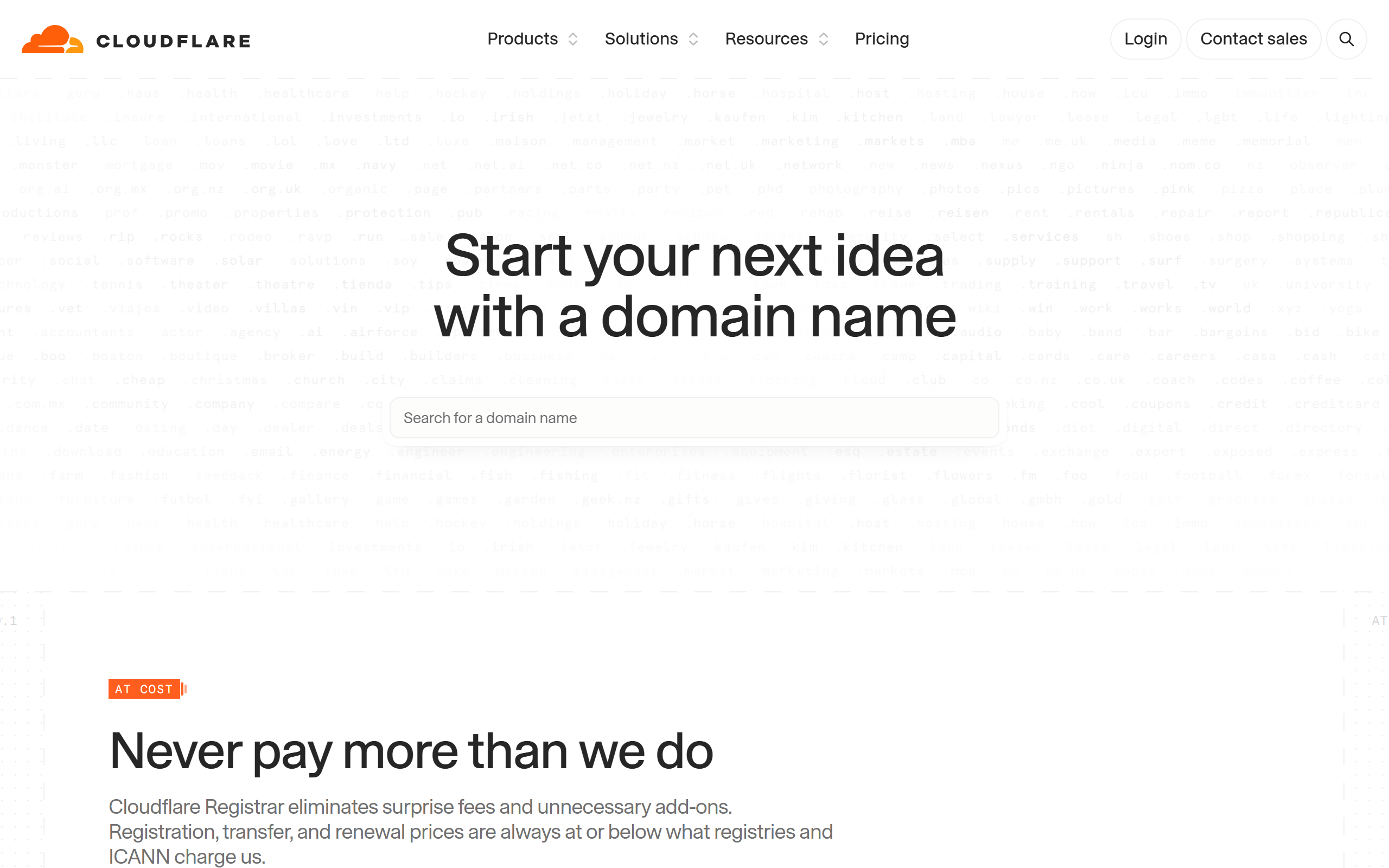
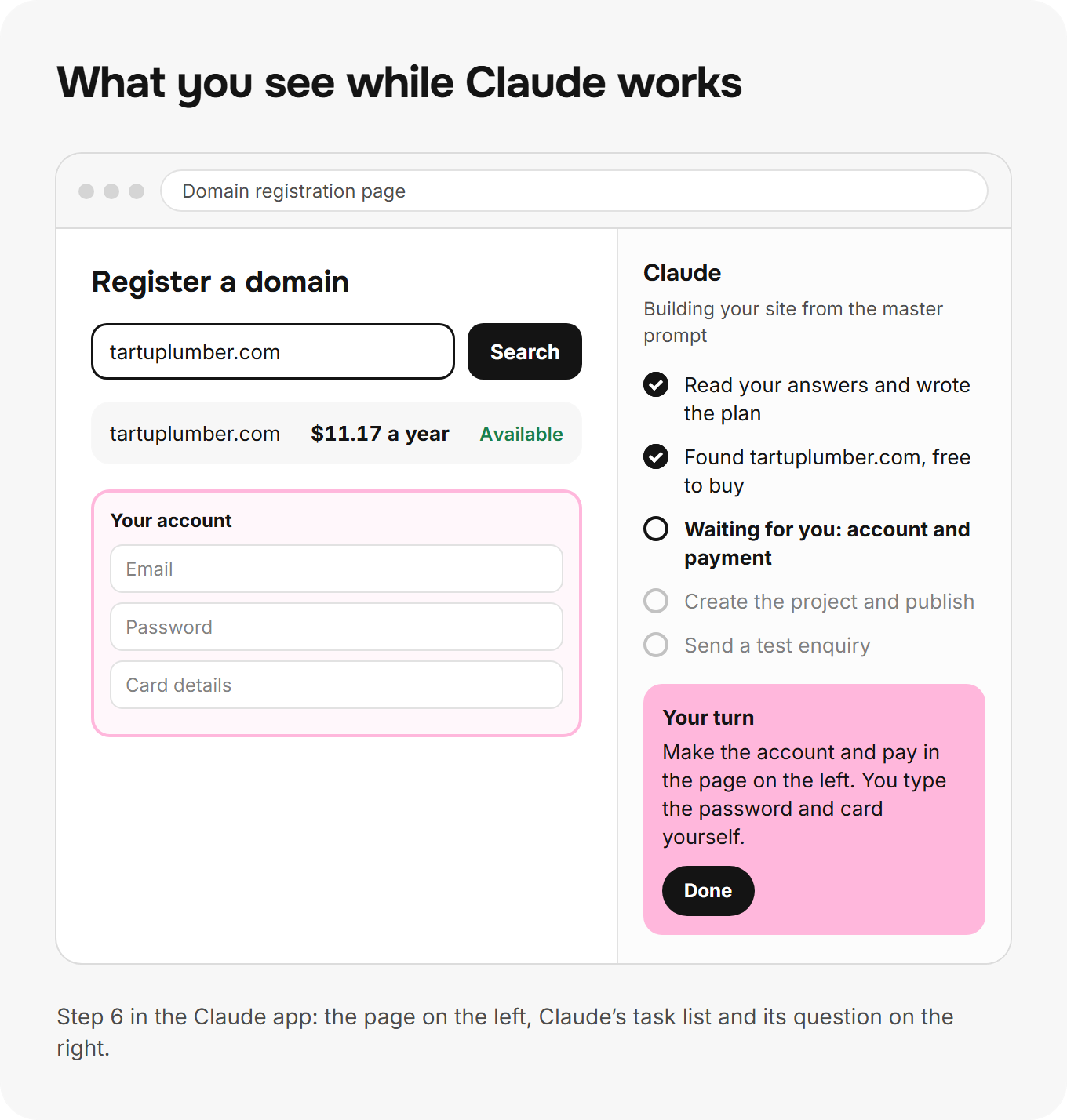
Create a free Cloudflare account, open Domain Registration and search for your name. A short domain with your trade or town in it is easier to say on the phone than a long one: "tartuplumber.com" beats "tartu-emergency-plumbing-services.com".
 (opens full size)
3. Open the GitHub account (5 minutes)
Sign up for GitHub on the free plan with your business email. Claude creates the repository later; you only need the account.
 (opens full size)
4. Collect your material (30 minutes)
Put your prices, services, area, phone number, reply time and 10 photos of your own work in one folder. Your own photos are the single biggest difference between your site and every template: a real van, a real bathroom you fixed, your real face.
5. Paste the master prompt (2 minutes)
Open the Claude app, copy the master prompt and paste it. Claude starts with questions, one of them the email address for your private admin page. Answer them in one message.
6. Let Claude build and publish (110 minutes)
Claude writes the plan, builds the pages, creates the GitHub repository, connects it to Cloudflare and puts the site live on your domain. It stops whenever it needs you: "Log in to Cloudflare", "Confirm the payment for the domain". You click, say "done", and it carries on.
7. Test it on your phone (15 minutes)
Open the site on your phone, tap the call button, and send yourself an enquiry through the form. The enquiry has to show in your inbox and in /admin within a minute.
8. Connect Google (25 minutes)
Claude adds the site to Google Search Console and submits the sitemap, both free (Search Console). Then it checks that your Google Business Profile shows the same name, phone, hours and website as the site.
What must the first screen show?
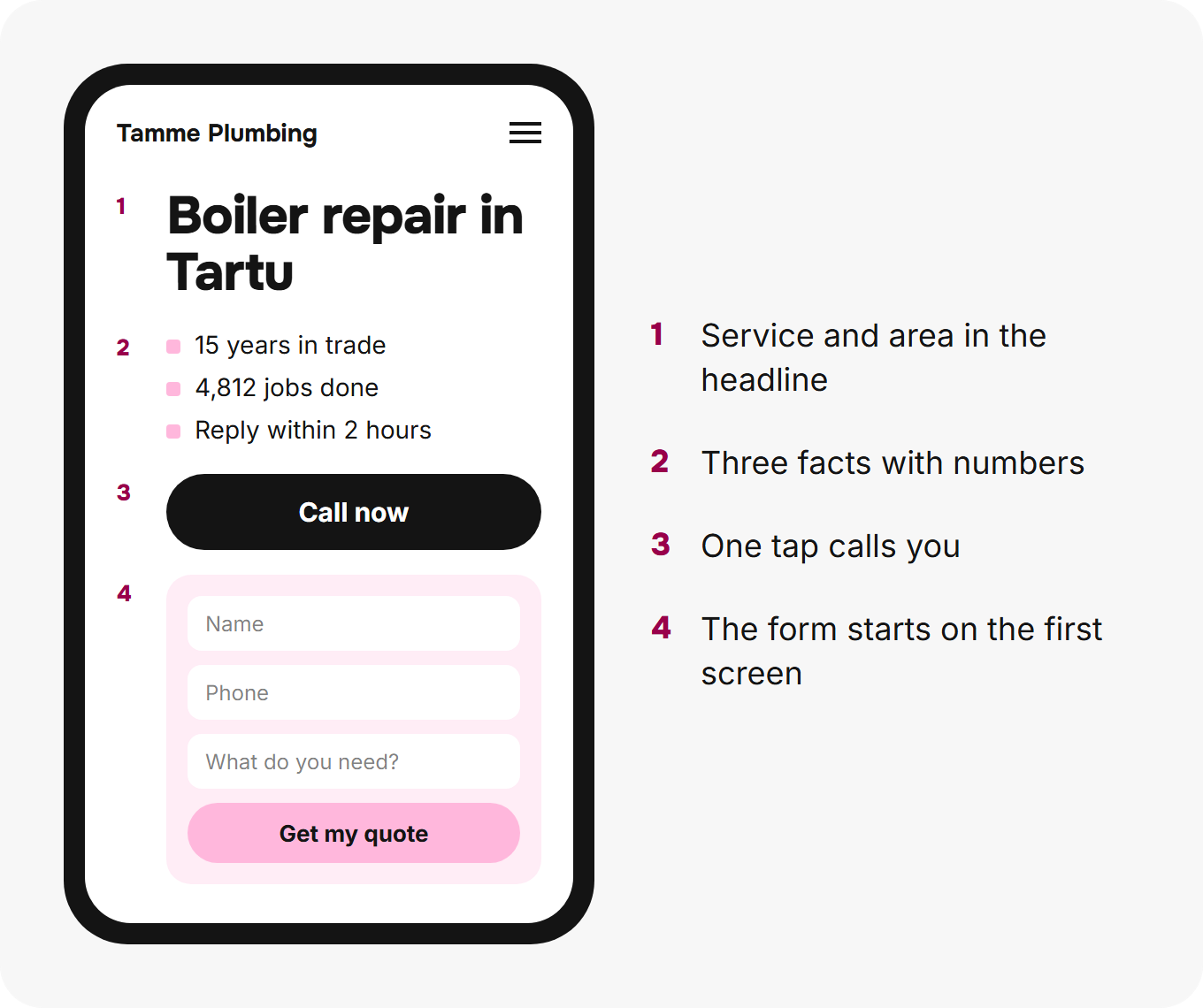
The first screen on a phone shows four things before any scrolling: the service and the area in the headline, three reasons to trust you, a call button and the start of the form. A visitor decides in that one screen whether to call you or the next result.
REND audited 2,317 websites of service businesses in Estonia, and 1,186 of them hide the phone number below the first screen. Every one of those sites makes the most ready buyers scroll to find out how to buy.
The prompt writes the rule into the build:
1. A headline that names the service and the area: "Boiler repair in Tartu", never a slogan.
2. Three reasons to trust me, each one a fact with a number: years in trade, jobs done, reply time, guarantee.
3. A call button that dials my number on one tap.
4. The start of the enquiry form, or a button that scrolls straight to it.
How should the enquiry form work?
The enquiry form asks for three things, saves what the visitor types even if they never press send, and tells them when you'll reply. That's how REND builds every form on every client site.
Fewer fields bring more enquiries. Mikko Laine, REND's Lead Web Developer, ran 41 split tests on client forms, and the three-field version beat the five-field version in 29 of them. "Name, phone and what you need is all a tradesperson needs to call back," he says. "Every field after that is a question the customer answers by leaving."
A half-filled form is still a lead. When a visitor types a name and a phone number and then gets a call from their mother, the form has already saved both. You phone them back the same afternoon.
1. Three fields: name, phone, what they need. Email is optional. Every extra field costs enquiries.
4. Save each field to the database as it is typed, a second after the visitor stops typing, against one ID per visit. A half-filled form is still an enquiry I call back.
5. The button names the outcome: "Get my quote", never "Submit".
6. Under the button, one line with my reply time, the same words everywhere on the site.
The thank-you screen is the second half of the form. It says what happens next, when, and gives your phone number for urgent jobs. A visitor who comes back the next day sees "We've got your request", not the empty form again.
Why does your site need a private /admin page?
Your site needs a private /admin page because an inbox loses enquiries and a list doesn't. Of the 2,317 sites REND audited, 1,204 send form enquiries to one email address and store them nowhere else: one spam filter or one full mailbox and the job is gone.
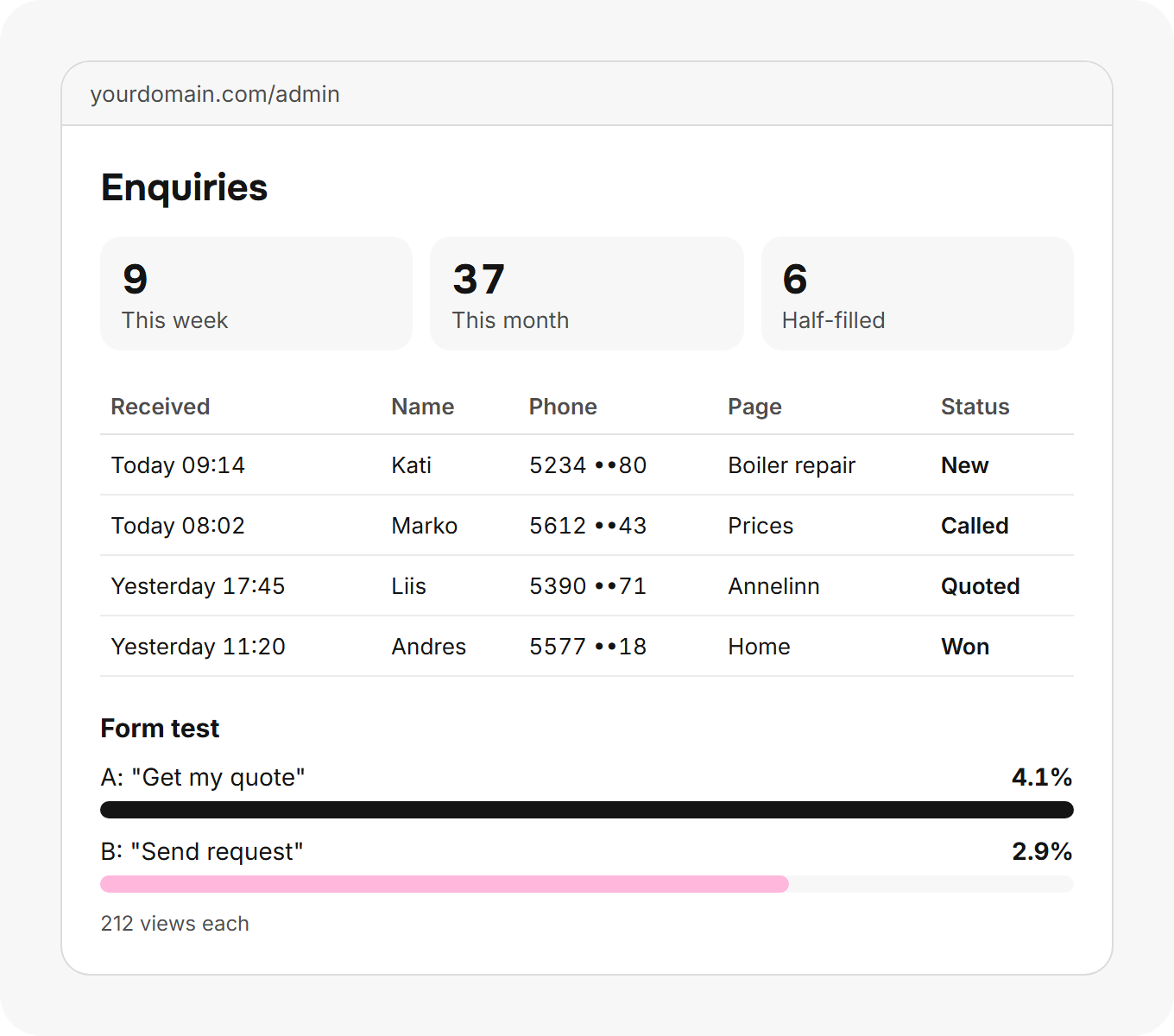
The prompt tells Claude to ask you for an email address first. That address becomes the only account that opens /admin, with a one-time code instead of a password. Behind the login you see every enquiry, newest first, with a tap-to-call number, the page it came from and whether the visitor finished the form.
1. Build /admin, the only page that needs a login. Ask me for the email address that owns it (interview question 4).
2. Login is a one-time code or a magic link sent to that email. No password to remember. Sessions last 30 days.
5. Each enquiry has a status I set: new, called, quoted, won, lost.
Mark each enquiry as called, quoted, won or lost. After a month you know which page brings the jobs that pay.
How do split tests make the form better on their own?
A split test shows half your visitors one version of the form and half another, counts the enquiries from each, and keeps the winner. The prompt bakes it in, so the form improves while you work.
Each test changes one thing: the button text first, then the number of fields, then the line above the form. After 100 views of each version, a version that's ahead by 25% becomes the default and the next test starts. You see the score in /admin.
1. The form runs a split test from day one: half the visitors see version A, half see version B. Each visitor keeps the same version on every visit.
5. After each version has 100 views and one is ahead by 25% or more, make it the default and start the next test. Tell me in /admin what changed.
Which SEO work does the prompt do for you?
The prompt does the technical search work a small business never has time for: one page per service and area, answers in the first sentence, structured data, clean links, a sitemap, fast images and checks at phone width. You don't need to understand any of it; Claude follows it line by line.
Here's what the main parts mean in plain words:
- One page per service and per area you serve. Someone searching "boiler repair Tartu" lands on a page about exactly that, not on a home page about everything.
- The answer in the first sentence. Google and AI assistants like ChatGPT quote the first sentence under a heading. A page that answers straight away is the one they quote.
- Structured data. A few lines of code tell Google your trade, area, phone and hours in a form a machine reads without guessing.
- Addresses that never break. A page that moves keeps a permanent redirect, so a link someone shared last year still works.
- Light images. Your photos are shrunk to the size the screen shows, so the page opens fast on a phone in a basement.
- Posts that keep it growing. A new site wins more searches with every useful post you add; the SEO blog guide shows how to write them.
1. The first sentence of every page answers the main question in the customer's words. Then the detail.
5. Every service page has a price, what affects it, how long the job takes, and four real questions in a "Frequently asked questions" section.
2. Once a page is live, its address never changes. If a page must move, add a single permanent 301 redirect from the old address to the closest live page. If it is gone for good, answer 410.
The master prompt
The master prompt is the whole build in one message: copy it, paste it into the Claude app and answer Claude's questions. It's split into sections so you see what each part does; the copy button takes all of it.
1Your job
You are building a website for my local service business, from an empty folder to a live site on my own domain. You work in the browser built into the Claude app (or in my Google Chrome through Claude in Chrome) and in the files of one GitHub repository. The site has one job: turn visitors from Google into phone calls and enquiries. Every decision below serves that job.

Work in this order: interview me, write the plan, build, publish, test, hand over. Finish each stage before the next one. Never ask me to do a technical step that is yours to do.
2Accounts and payments
1. I create the accounts and I pay. Everything else is yours.
2. When you reach a step that needs a new account, a login, a password, a payment or a verification code, stop and tell me in one line: the site, what to click and what you need from me. Wait until I say "done", then continue.
3. Never type a password, a card number or a code for me. Never accept paid add-ons, upgrades or trials without asking.
4. The stack: a Cloudflare account (domain, DNS, hosting, database, spam protection, analytics, email routing), a free GitHub account (the site's code), and you. Use only free plans. If something would cost money, name the price and ask first.
5. My domain: buy it in my Cloudflare account. If Cloudflare doesn't sell my domain ending (for example .ee), I buy it at a registrar for that ending and you point its nameservers to Cloudflare.
3Ask me first
Before you write any code, ask me these questions in one message and wait for my answers:

1. Business name, the trade in plain words, and the town or area I serve.
2. Every service I sell, with a price or a starting price for each.
3. My phone number and the hours I answer it.
4. The email address that will log in to the private admin page and receive every enquiry.
5. How fast I reply to an enquiry (for example "within 2 hours on workdays").
6. The languages my customers speak.
7. Photos of my own work, my van, my team or my premises (I'll upload them or give you a folder).
8. My domain, or three ideas for one.
9. Anything that sets me apart: years in trade, guarantee, certifications, jobs done, reviews.

If I skip a question, leave that element off the site and add it to a list of what's missing. Never invent a fact about my business: every price, review, person, figure, case study and certificate on the site is real and comes from me.
4How to build it
1. One GitHub repository named after the domain. Commit after every finished stage with a plain message.
2. Static HTML, CSS and a little JavaScript, with a Cloudflare Worker for the form, the admin page and the split tests. No page builder, no heavy framework, no paid service.
3. Host on Cloudflare Workers with static assets, deployed from the GitHub repository. Static files are free; the form and admin stay inside the free daily limits.
4. Store every enquiry in a Cloudflare D1 database: time, page, form version, every field, and whether the visitor finished the form.
5. Protect the form with Cloudflare Turnstile in its invisible mode. Never block search engines or AI crawlers.
6. Turn on Cloudflare Web Analytics. It sets no cookies, so the site needs no cookie banner.
7. Send me an email for every new enquiry with the visitor's name, phone, message and the page it came from. Use Cloudflare Email Routing or another free sender, and test that it reaches my inbox, not spam.
8. Keep secrets in Cloudflare's encrypted settings, never in the repository.
5Pages to build
1. Home: what I do, where, and how to reach me. 2. One page for each service, named the way customers search for it ("boiler repair", not "heating solutions"). 3. One page for each town or district I really serve, but only where there is something specific to say about that place (travel time, jobs done there, local building types). No copy-paste area pages. 4. About: who I am, years in trade, the people, the area, my own photos. 5. Contact: phone, email, hours, the area I cover, the form. 6. Prices, when I gave you prices. 7. A privacy page in plain words: what the form stores, why, for how long, and who to ask to delete it. 8. A designed 404 page with my phone number and links to the main services.6The first screen
The first screen a visitor sees on a phone, before scrolling, carries four things:

1. A headline that names the service and the area: "Boiler repair in Tartu", never a slogan.
2. Three reasons to trust me, each one a fact with a number: years in trade, jobs done, reply time, guarantee.
3. A call button that dials my number on one tap.
4. The start of the enquiry form, or a button that scrolls straight to it.

Check this on a 375 px wide screen. If any of the four is below the fold, shorten the text until it fits.
7The enquiry form
1. Three fields: name, phone, what they need. Email is optional. Every extra field costs enquiries.
2. One column, labels above the fields, a 16 px minimum font size so phones don't zoom.
3. The phone field accepts 7 to 15 digits with spaces or a plus sign, and the right keyboard opens on phones.
4. Save each field to the database as it is typed, a second after the visitor stops typing, against one ID per visit. A half-filled form is still an enquiry I call back.
5. The button names the outcome: "Get my quote", never "Submit".
6. Under the button, one line with my reply time, the same words everywhere on the site.
7. After sending, show a thank-you screen that says what happens next and when, repeats my phone number for urgent jobs, and never shows the same form again.
8. A visitor who already sent the form sees their next step on later visits, not the form.
9. Errors appear next to the field in plain words and keep everything the visitor typed.
8The private admin page
1. Build /admin, the only page that needs a login. Ask me for the email address that owns it (interview question 4).
2. Login is a one-time code or a magic link sent to that email. No password to remember. Sessions last 30 days.
3. /admin stays private: it is noindex, out of the sitemap, refuses every other email, and returns the login screen to anyone without a session.
4. /admin lists every enquiry, newest first: date and time, name, phone (tap to call), message, page, form version, and finished or half-filled.
5. Each enquiry has a status I set: new, called, quoted, won, lost.
6. A filter by status, and a download of everything as a spreadsheet file.
7. A short summary at the top: enquiries this week, this month, and the share that came from each page.
8. The split test results (next section) sit on the same page.
9Split tests
1. The form runs a split test from day one: half the visitors see version A, half see version B. Each visitor keeps the same version on every visit.
2. Start with the button text, then the number of fields, then the headline above the form. Change one thing at a time.
3. Store the version with every enquiry and every form view.
4. /admin shows, per version: views, enquiries and the rate.
5. After each version has 100 views and one is ahead by 25% or more, make it the default and start the next test. Tell me in /admin what changed.
6. Never test anything that changes my prices, my phone number or my promises.
10Writing every page for Google and AI answers
1. The first sentence of every page answers the main question in the customer's words. Then the detail.
2. One H1 per page with the service and the area. H2 headings are the questions customers ask; the first sentence under each heading answers it.
3. Titles: the main phrase first, 60 characters or fewer, my business name after a pipe. Meta descriptions: 140 to 150 characters, the main phrase first, one concrete fact.
4. Write in short, confident statements with exact numbers: "A boiler service takes 90 minutes", not "it takes a while". No buzzwords, no filler.
5. Every service page has a price, what affects it, how long the job takes, and four real questions in a "Frequently asked questions" section.
6. Use real HTML tables for prices and lists for steps.
7. Never put the same paragraph on two pages. If two pages would compete for one search, merge them.
11Structured data
1. Home: Organization plus my trade type (for example Plumber, Electrician, HVACBusiness) with my name, address or service area, phone, hours, and the URL.
2. Each service page: one Service with my business as provider, the area served and the page URL.
3. A FAQPage only where the questions are visible on the page, word for word.
4. BreadcrumbList on every page except the home page.
5. No review stars or ratings in the markup.
6. Test every page in Google's Rich Results Test and fix every error.
12Links, sitemap and crawlers
1. The home page links to the service pages. Every service page links back to the home page in its first paragraph and to its own area pages. 2. Link text says where the link goes ("boiler repair prices"), never "click here". 3. sitemap.xml lists every public page with its last change date; robots.txt points to it and allows Google, Bing and the AI assistants' crawlers. 4. Add an llms.txt with my business facts and the main pages. 5. Check every link before publishing. No broken links, no orphan pages.13Addresses that never break
1. Short, lower-case addresses with hyphens that describe the page: /boiler-repair, /tartu. No dates, no prices, no numbers.
2. Once a page is live, its address never changes. If a page must move, add a single permanent 301 redirect from the old address to the closest live page. If it is gone for good, answer 410.
3. One rule for trailing slashes, with a redirect from the other form.
14Images
1. Use my own photos first. Never stock photos of people pretending to be my team. 2. Convert every photo to WebP, no wider than twice its displayed size, compressed until a smaller file would look worse. Images with text (prices, diagrams) stay sharp. 3. Every image has a width, a height and lazy loading, except the first image on the page. 4. Every image has alt text that says what is in the picture plus one concrete fact ("Copper pipes replaced under a kitchen sink in Tartu, a 3-hour job"). 5. Make a 1200 × 630 sharing image for each page with its title, in my colours.15Speed and phone checks
1. Test every page at 375, 390, 768 and 1440 px wide: no sideways scrolling, nothing cut off, buttons at least 44 px tall.
2. Run Lighthouse on mobile for every page: performance 90 or more, accessibility 100. Fix what it finds.
3. Fonts load from the site itself, at most two families.
4. Send a test enquiry from a phone and confirm it appears in /admin and in my inbox.
16Languages
1. Each language gets its own pages, written naturally in that language, not translated word for word, with its own addresses (/en/, /ru/ and so on).
2. Link the language versions to each other with hreflang tags.
3. A language switch at the top of every page, each language named in itself (Eesti, English, Русский).
17Google
1. Walk me through adding the site to Google Search Console (I log in, you do the rest), verify it through Cloudflare DNS, and submit the sitemap.
2. Check my Google Business Profile: the name, phone, hours and website must match the site exactly. Tell me what to fix.
3. Request indexing for the home page and every service page.
18When you finish
Send me one short report:

1. The live address and the /admin address.
2. What you built, page by page.
3. Every account the site uses and what is on a free plan.
4. Every element you left out because I had no material for it yet, and exactly what you need from me to add it.
5. The three changes that would bring the most enquiries next.
19Optional, highly recommended: my brand and trust material
Use everything below that I give you; all of it is real. It makes the site mine instead of a template. If I leave an item out, leave that element off the site and add it to your list of what's missing. Never invent, estimate or fill in people, reviews, figures, case studies or credentials.

1. Logo: "SVG or PNG on a clear background".
2. Brand colours: "dark blue #12355B and orange".
3. Fonts: "the font on my van".
4. Signature graphic: "the wave from my business card".
5. One-line promise: "Leaks fixed the same day".
6. Founder story: "started with one van in 2009".
7. Founder photo: "head and shoulders, in work clothes".
8. Team with titles: "Mart, master plumber".
9. Team photos: "real people, not stock".
10. Years in business: "15 years".
11. Jobs done: "4,812 jobs since 2009".
12. Customers served: "2,960 households".
13. Service area: "Tartu and 30 km beyond".
14. Opening hours: "Mon to Fri 8 to 18".
15. Response time: "on site within 3 hours".
16. Prices: "call-out €45, then €40 an hour".
17. Guarantee: "2 years on every job".
18. Certifications: "Estonian qualified plumber, level 5".
19. Laws and standards you follow: "EVS-EN 806 for drinking water".
20. Insurance: "liability insured to €100,000".
21. Memberships: "member of the plumbers' association".
22. Reviews with names: "Kati from Annelinn, 5 stars".
23. Case studies: "bathroom rebuilt in 4 days".
24. Before and after photos: "same angle, same room".
25. Office or workshop photos: "the workshop on Ringtee".
26. Van and workwear photos: "logo on the van door".
27. First-party figures: "73% of our jobs are repeat customers".
28. Awards and press: "article in the local paper", with the link.
29. Partners and brands you install: "authorised installer for one boiler brand".
30. Payment options: "card, bank transfer, invoice for companies".
31. Words you always use: "call-out", "on site".
32. Words you never use: "cheap", "unbeatable".
33. Your voice: "short sentences, like I talk on the phone".
34. Social profiles: "Facebook page, Instagram".
35. Legal details for the footer and privacy page: "company name and registry code".
Give your agent your brand and trust material
The last section of the prompt is optional and the one that makes the biggest difference: your logo, colours, story, people, figures, reviews and guarantees. Without it Claude builds a clean site that looks like a hundred others. With it, the site looks and sounds like you.
The list in the prompt names 35 things, each with a short example: the logo, brand colours, the founder story, the team with titles, years in business, jobs done, the service area, response time, prices, guarantee, certifications, the laws and standards you follow, reviews with names, case studies, photos of your workshop and van, and your own figures. Give Claude your real material, whatever you have today. Claude never invents the rest: it leaves those parts off the site and lists what's missing, so you add them as you collect them. Your logo, colours and voice together are the brand identity of a small business: settle them before the build and every page carries them.
11. Jobs done: "4,812 jobs since 2009".
15. Response time: "on site within 3 hours".
22. Reviews with names: "Kati from Annelinn, 5 stars".
What goes wrong, and how do you fix it?
Six things go wrong in a first build, and each one has a fix that takes minutes.
| What happens | The fix |
|---|---|
| Claude can't open a page | The built-in browser comes with the Claude desktop app on a paid plan. Update the app and sign in again. The Chrome extension works in Google Chrome only, not Edge or Brave. |
| Cloudflare doesn't sell your .ee domain | Buy it from an Estonian registrar and ask Claude to point its nameservers to Cloudflare. |
| The new domain shows an error for an hour | New domains take time to reach every network. Claude waits and tests again. |
| Test enquiries land in spam | Claude adds the email records Cloudflare lists for your domain, then sends a new test. |
| Claude stops halfway with a usage message | Claude Pro's usage resets every 5 hours. Wait for the reset and write "continue". |
| The site looks like a template | Give Claude the brand and trust section of the prompt with your own photos and figures. |
When is another route the better choice?
A website builder is the better choice for a business that wants no accounts at all and a visual editor to drag blocks into place. You pay for that comfort every month: €144 a year on Squarespace's cheapest annual plan (Squarespace pricing).
Hiring someone is the better choice when you have no afternoon to spare, or when you want more customers, not a website. We compare those routes in website builder vs web designer vs REND. REND builds the site and the search work behind it, backed by a guarantee: We guarantee 15 clients in 90 days, or a full refund.
Frequently asked questions
Can you build a website with AI for free?
Almost: the domain costs €10.11 a year for a .com and Claude Pro costs $20 for the month you build. Hosting, the database, spam protection, analytics, GitHub and Google's tools are free.
Do I need to know how to code?
No. Claude writes the code, publishes it and tests it in a browser on your computer. Your part is creating the accounts, paying when Claude asks, answering its questions and checking the site on your phone.
Is a website made with AI good for Google?
Yes, when it's built to the rules in the master prompt: one page per service and area, the answer in the first sentence, structured data, a sitemap and fast pages. Google ranks the page that answers the search best, not the way it was built.
Who owns a website made with Claude?
You do. The domain is in your Cloudflare account, the files are in your GitHub account and the enquiries are in your database. Cancelling Claude changes nothing on the live site.
Where to start
Start with the domain today: search for your name in Cloudflare and buy it before someone else does. Then set an afternoon aside, copy the master prompt and let Claude build.
Once search brings you enquiries, go after the customers you want most as well: cold email for small business shows how to write to them one at a time.
If your site is already live, start with an audit instead. It shows where enquiries go missing today and what to fix first.
 Edited by Andres LepikCo-founder & Head of Growth
 Fact-checked by Siim SaarHead of SEO
Post by Rasmus Kivi
Co-founder & CEO
Co-founded REND and still reads every client's monthly report himself before it goes out. He writes about what turns a search into a phone call for trades and service businesses.